Top 24 Best 3D Architecture Software in 2025
24 Best 3D Architecture Software: Innovation is at the forefront of the ever-evolving field of architectural design, and 2025 is no exception. With advancements in technology, 3D architecture software continues to revolutionize how professionals conceptualize, design, and execute projects.
These software solutions have become indispensable tools for architects, designers, and engineers, offering unparalleled precision, flexibility, and creativity in tackling modern design challenges. The top 24 3D architecture software of 2025 cater to diverse needs, from crafting intricate residential layouts to designing large-scale commercial projects and urban planning.
Their features, such as state-of-the-art rendering, virtual reality integration, and user-friendly interfaces, empower professionals to visualize their ideas in stunning detail and communicate seamlessly with collaborators. These platforms also enable faster decision-making and greater efficiency, helping teams stay ahead in a competitive landscape.
As the architecture industry embraces these tools, they are no longer just software. They are pivotal partners in shaping sustainable and innovative structures that define the future of design.
Whether you’re a seasoned expert or a newcomer, these solutions equip you with the capabilities to push boundaries, improve workflows, and bring visionary concepts to life.
Understanding 3D Architecture Software
What is 3D Architecture Software?
3D architecture software comprises digital applications that enable you to build, manipulate, and analyze three-dimensional models of buildings and structures. These tools have evolved significantly from simple drafting utilities to complex platforms that integrate computer-aided design (CAD) with Building Information Modeling (BIM) capabilities.
In practice, you can now create detailed models that not only capture your design aesthetics but also incorporate critical information such as material properties, structural performance, cost estimation, and energy efficiency. This transformation allows you to simulate real-world conditions and share immersive visualizations with clients and collaborators alike.
By moving from traditional 2D drawings to dynamic 3D models, you can explore multiple perspectives, test design hypotheses, and identify potential issues before construction begins. Whether you are refining initial sketches or working on advanced construction documents, incorporating 3D architecture software into your workflow elevates the precision, efficiency, and collaborative potential of your entire project.
Benefits of Using 3D Architecture Software
When you integrate 3D architecture software into your workflow, you unlock a variety of benefits:
- Enhanced Visualization: Create immersive, photorealistic models that bring your design concepts to life.
- Improved Accuracy: Utilize precise measurement tools to reduce errors and ensure technical exactness.
- Efficient Collaboration: Allow teams and stakeholders to interact with dynamic models for real-time feedback.
- Time and Cost Savings: Automate documentation processes and reduce rework through early error detection.
- Design Flexibility: Modify designs quickly as all elements update automatically.
- Sustainability Analysis: Simulate energy performance and environmental impact early in the design process.
- Error Detection: Identify potential fabrication issues before construction, saving resources and time.
Types of 3D Architecture Software
Computer-Aided Design (CAD) Software
CAD software forms the backbone of architectural drafting, enabling detailed 2D drawings and 3D modeling. You use these tools to create technical drawings, precise annotations, and construction documents that adhere to industry standards. CAD applications are essential when you require exact measurements and detailed documentation.
Building Information Modeling (BIM) Software
BIM software revolutionizes work by building intelligent, data-rich models. Each building component is embedded with critical information such as material properties, cost data, and thermal performance. BIM fosters cross-disciplinary coordination, ensuring that every detail, from structural elements to electrical systems, is seamlessly integrated throughout a project’s lifecycle.
Visualization and Rendering Software
For impactful client presentations and marketing, visualization software transforms technical models into photorealistic imagery and animations. These tools simulate realistic lighting, textures, shadows, and environmental conditions, enabling you to present your designs with a level of realism that textual drawings cannot match.
Specialized Architectural Software
Some solutions are purpose-built for niche markets such as interior design, landscape architecture, or residential planning. These specialized applications provide streamlined workflows and focused toolsets tailored to specific tasks, making them ideal for projects that require unique design approaches.
Top 24 Best 3D Architecture Software in 2025
The Top 24 3D architecture software of 2025 revolutionize design with advanced rendering, intuitive interfaces, and seamless collaboration tools. These platforms empower architects and engineers to create precise models, visualize projects in detail, and streamline workflows. From residential layouts to urban planning, they redefine innovation, efficiency, and creativity in modern architecture.
1. SketchUp
SketchUp is celebrated for transforming design ideas into 3D models with intuitive simplicity. Originally a Google project and now supported by Trimble, SketchUp is built to support both basic conceptual sketches and more advanced modeling needs.
Its user-friendly interface, supplemented by an extensive 3D Warehouse, offers immediate access to millions of pre-made components. Whether you are a student, a freelancer, or part of a large firm, SketchUp enables rapid prototyping and visualization, making it a preferred choice for the early design stages.
Key Features
- Drag-and-drop modeling tools for quick concept development
- Extensive 3D Warehouse with millions of pre-made objects
- Virtual Reality (VR) integration for immersive walkthroughs
- Seamless compatibility with major software like AutoCAD
- Extensions marketplace for additional specialized features
- Dynamic components for responsive, parametric design
Pros
- Extremely user-friendly with a brief learning curve
- Ideal for rapid prototyping and conceptual visualization
- The vast library of assets minimizes development time
Cons
- Limited precision for highly technical construction drawings
- Advanced rendering may require third-party plugins
- Complex projects can strain the native toolset
2. Rhino 3D
Rhino 3D (commonly known as Rhino) offers unparalleled versatility through its NURBS-based modeling engine. Developed by Robert McNeel & Associates, Rhino excels at tackling freeform and organic geometries, making it indispensable for innovative and complex designs.
Its integration with Grasshopper, a visual scripting tool, empowers you to explore parametric and computational design avenues. Rhino is particularly well-suited for projects that require both artistic freedom and mathematical precision, allowing you to push the boundaries of conventional architectural forms.
Key Features
- Powerful NURBS-based modeling for precise curves and surfaces
- Grasshopper integration for advanced parametric design
- Extensive plugin library for custom tool enhancements
- Support for multiple file formats ensuring interoperability
- Advanced analysis tools for curvature and surface quality
- Scripting capabilities to automate repetitive design tasks
Pros
- Exceptional for intricate, freeform design work
- High precision meets detailed engineering requirements
- Grasshopper facilitates an iterative and dynamic design process
Cons
- Steeper learning curve compared to simpler software
- Lacks built-in high-end rendering capabilities
- Not optimally structured for complete BIM workflows
3. AutoCAD
For decades, AutoCAD has been the industry standard for precision drafting and 3D modeling. Developed by Autodesk, AutoCAD integrates a comprehensive suite of tools that aid in producing detailed construction drawings and technical documentation with unrivaled accuracy.
Its architecture-specific version comes equipped with tailored libraries and automation features that streamline the documentation process. Despite its complexity, AutoCAD’s flexibility and power make it a stalwart for professionals who require meticulous detail and reliable performance across varied project scales.
Key Features
- Comprehensive 2D drafting and annotation toolset
- Powerful 3D modeling with support for solids, surfaces, and meshes
- Extensive customizable libraries for architectural components
- Advanced layer and file management systems
- Cloud collaboration options for real-time updates
- Precise dimensioning and measurement tools
Pros
- Industry standards recognized by professionals worldwide
- High reliability and precision in technical execution
- Extensive documentation and customization options
Cons
- Steep learning curve and complex interface
- Subscription-based pricing can be expensive
- High system requirements for processing large projects
4. Autodesk Revit
Autodesk Revit transforms traditional building design through its robust Building Information Modeling (BIM) environment. It creates a unified, data-rich model where every element, from walls to windows, carries vital information that updates dynamically throughout the project.
Revit’s parametric design system ensures that modifications automatically propagate, maintaining consistency across all design documents. This capability makes Revit an indispensable tool for large-scale collaborations and interdisciplinary coordination. Whether you’re producing detailed documentation or advanced simulations, Revit’s comprehensive feature set offers a holistic approach to modern architectural design.
Key Features
- Integrated, data-rich BIM environment
- Parametric components that update across all views
- Automated generation of construction documentation
- Advanced clash detection and coordination tools
- Built-in rendering engines for quick visualizations
- Energy modeling and sustainability analysis features
Pros
- Streamlines workflow through automatic updates and data integration
- Facilitates cross-disciplinary team collaboration
- Comprehensive documentation capabilities improve efficiency
Cons
- High complexity requires significant training investment
- Demands powerful hardware for large-scale models
- Subscription fees may burden smaller firms
5. ArchiCAD
ArchiCAD by Graphisoft is the first BIM software developed specifically for architects. It blends intuitive design with sophisticated data management, allowing you to create interconnected 2D and 3D models that update in real-time, preserving design integrity throughout the project lifecycle.
ArchiCAD’s pioneering virtual building approach means that every element in your model is intelligent, carrying embedded data to enhance decision-making. Perfect for both residential and commercial projects, this software bridges creative design with precise documentation and robust collaboration features.
Key Features
- Comprehensive BIM capabilities for seamless design integration
- Intelligent, parametric building components
- Synchronized 2D/3D model environment for real-time updates
- Built-in energy and sustainability analysis tools
- Automated construction documentation generation
- Integrated visualization tools like BIMx for interactive presentations
- Collaborative design functionalities with advanced teamwork support
- Open BIM standards for interoperability
Pros
- Tailored for architects with an intuitive design-focused interface
- Balances creativity with stringent data management
- Robust visualization and collaboration tools
Cons
- Adoption may vary across different regions
- Transitioning from traditional workflows requires training
- Limited integration with certain engineering disciplines
6. Lumion
Lumion is designed to transform your technical models into breathtaking, photorealistic visualizations in real-time. Developed specifically for architects, it lets you add dynamic effects such as weather, lighting changes, landscaping, and animated features with minimal setup.
Lumion bridges the gap between design and presentation by delivering rapid, high-quality renders that captivate clients and stakeholders. Its intuitive interface makes it easy to experiment with various design aesthetics without deep technical expertise, allowing you to focus on creativity while producing professional-grade imagery.
Key Features
- Real-time rendering for instantaneous visual feedback
- Extensive asset library, including objects, vegetation, and textures
- Dynamic environmental effects such as weather and lighting simulations
- Animation tools for creating walkthroughs and presentation videos
- LiveSync integration with popular CAD/BIM programs
- Panorama and VR output options for immersive experiences
Pros
- Fast rendering speeds that accelerate the design-to-presentation cycle
- Extremely user-friendly interface requiring minimal training
- Rich visual assets enhance the realism of presentations
Cons
- Serves primarily as a rendering solution, not a design tool
- Relies on other software for primary model creation
- Requires high-performance hardware for smooth operation during real-time rendering
7. 3ds Max
Autodesk 3ds Max is renowned for its ability to produce stunning, photorealistic visualizations and animations. Although it began as a tool for high-end computer graphics and animation, 3ds Max has evolved to serve architects who need complete creative control over the visualization process.
With powerful modeling, texturing, and lighting systems bolstered further by the integrated Arnold renderer 3ds Max, it lets you craft intricate renders and detailed animated walkthroughs. This versatility makes it the preferred choice for visualization studios that require both technical precision and artistic expression.
Key Features
- Advanced 3D modeling tools for intricate details
- Comprehensive material editor for high-fidelity textures
- Integrated Arnold renderer for photorealistic output
- Extensive animation features for dynamic walkthroughs
- Particle systems and simulation tools for environmental effects
- Customizable MAXScript for workflow automation
Pros
- Industry-standard tool for high-end visualizations and animations
- Offers exceptional creative control over every visual element
- Broad third-party support and abundant resources
Cons
- A steep learning curve demands substantial training
- High system requirements may limit performance on older machines
- Not primarily designed for technical architectural drafting
8. Blender
Blender is a powerful, free, and open-source 3D creation suite that has matured into a compelling alternative for architectural modeling, rendering, and animation. Initially popular with animators and game developers, Blender now offers a robust collection of tools that rival costly commercial software.
With its dual rendering engines, Cycles for photorealistic results, and Eevee for real-time previews, Blender empowers you to create everything from initial concept sketches to polished final renderings. Its continuously growing community ensures that you have access to a wealth of tutorials and plugins that extend its functionality for complex architectural projects.
Key Features
- Full-featured 3D modeling toolkit for organic and technical designs
- Dual rendering engines: Cycles (photorealism) and Eevee (real-time)
- Integrated physics and particle simulation for dynamic effects
- Powerful, node-based material editor for detailed customizations
- Python scripting for customized workflow automation
- Built-in animation and video editing features to complete projects
Pros
- Completely free and open-source, lowering entry costs
- Robust, all-in-one solution suitable for many design tasks
- Extremely active community with vast learning resources
Cons
- Interface can be daunting for newcomers
- Lacks native BIM workflows found in specialized software
- It may require extensive customization for high-end architectural needs
9. Chief Architect
Chief Architect is purpose-built for residential architecture and interior design, streamlining the creation of detailed 3D home designs and construction documentation. With an intuitive interface and automated generation of models, floor plans, and elevations, the Chief Architect enables you to turn ideas into comprehensive design packages efficiently.
Whether you are a professional home designer or a DIY enthusiast, this software provides intelligent libraries, cost estimation tools, and code compliance features designed specifically for residential projects, helping you deliver projects that are both beautiful and buildable.
Key Features
- Automatic conversion from 2D floor plans to detailed 3D models
- The vast library of residential architectural elements
- Automated creation of elevations, sections, and construction details
- Integrated cost estimation and materials calculation tools
- Specialized modules for kitchens, baths, and interior design
- Code compliance checks tailored for residential standards
Pros
- Streamlined workflow specifically for residential design
- Intuitive and user-friendly interface
- Rapid generation of comprehensive documentation
Cons
- Not suitable for large-scale or commercial projects
- Limited flexibility for unconventional designs
- Integration with other architecture software can be challenging
10. Adobe Photoshop
Adobe Photoshop is the industry’s leading image editing software, essential for post-production work in architectural visualization. While not a 3D modeling tool, Photoshop plays a crucial role in enhancing renderings produced in other software.
You can refine colors, adjust lighting, and composite multiple images to create advocates for your design vision. Its powerful layering system, selection tools, and myriad filters allow you to transform a good rendering into an exceptional visual presentation that captures both detail and atmosphere.
Key Features
- Advanced image editing with non-destructive layers
- Comprehensive selection, masking, and adjustment tools
- Extensive range of filters and creative effects
- Precise color correction and photo manipulation capabilities
- Seamless integration with the Adobe Creative Cloud suite
- Batch processing for efficient handling of multiple files
Pros
- Industry standard for high-quality post-production editing
- Unmatched control over image enhancements and compositing
- Widely available tutorials and community support
Cons
- Does not support native 3D modeling functions
- Subscription-based pricing may be a barrier for some
- Resource-intensive when processing large-format images
11. V-Ray
V-Ray is renowned for its cutting-edge photorealistic rendering capabilities. Integrated with many of the top 3D modeling platforms, V-Ray employs advanced techniques like global illumination and ray tracing to produce visuals that mirror real-life lighting and materials with stunning accuracy.
Its physically based rendering approach makes it a favorite of visualization professionals who require uncompromised realism. Whether you’re in architectural visualization or high-end product design, V-Ray elevates your images to a level that distinguishes your work from the competition.
Key Features
- Physically accurate rendering engine with ray tracing and global illumination
- Extensive library of realistic materials and textures
- GPU acceleration significantly reduces render times
- Integrated denoising and frame buffer for polished outputs
- Progressive rendering for real-time visual feedback
- Comprehensive integration with multiple modeling platforms
Pros
- Computes photorealistic images matched to real-world physics
- Enhances flexibility due to broad software integration
- Abundant documentation and supportive community
Cons
- Requires a steep learning curve for optimal results
- High system demands for complex scenes
- Additional licensing costs increase total project expenditure
12. Cedreo
Cedreo is a cloud-based 3D home design platform optimized for home builders, remodelers, and interior designers. It simplifies the process of creating comprehensive home designs by enabling you to generate detailed 3D visualizations in hours rather than days.
By automating tasks and offering an extensive library of residential components, Cedreo empowers you to quickly produce realistic renderings and floor plans that are ideal for client presentations and marketing materials. Its accessibility via the cloud makes it a convenient solution for design professionals on the move.
Key Features
- Intuitive floor plan creation with one-click 3D model generation
- Extensive library of residential architectural elements and furnishings
- Rapid one-click rendering functionality for fast outputs
- Cloud-based access from any computer with an internet connection
- Automated terrain, landscaping, and environment simulation tools
- Built-in measurement and annotation features for enhanced communication
Pros
- Extremely low learning curve for beginners
- Accelerates residential design and presentation processes
- Cloud-based platform minimizes local hardware dependencies
Cons
- Customization options are limited compared to professional tools
- Primarily focused on residential projects and less suited for commercial work
- Dependent on a stable internet connection for full functionality
13. D5 Render
D5 Render harnesses real-time ray tracing and the speed of modern game engines to deliver photorealistic visualizations with minimal lag. It is designed to let you see the impact of design changes instantaneously while maintaining high image quality.
D5 Render’s intuitive interface and powerful asset library allow you to generate high-quality images and animations quickly, making it perfect for fast-paced design reviews and client presentations. Its user-centric design ensures that even those new to rendering can produce professional results in a timely manner.
Key Features
- Real-time ray tracing for immediate visual feedback
- Accurate lighting and material simulation for realistic renderings
- Extensive, continuously updated asset library for environmental enrichment
- Dynamic controls for weather, time of day, and atmospheric effects
- Integrated post-processing for final image refinement
- Direct import support from major architectural software
Pros
- Balances visual quality with rapid output
- User-friendly interface ideal for both novices and experts
- Regularly updated features keep it competitive with industry leaders
Cons
- Relatively new with a growing industry presence
- Requires high-performance hardware for optimal speed
- Subscription pricing can increase long-term operational costs
14. Chaos Enscape
Enscape is a unique real-time rendering and virtual reality plugin that integrates natively with popular BIM and CAD software, turning your 3D models into immersive, interactive experiences. With just one click, you can transition from design mode to a fully navigable VR experience, allowing you to walk through your building before construction begins.
Enscape’s streamlined approach delivers high-quality visual feedback in real time, making design iteration faster and more intuitive. It is particularly useful for presentations where clients and stakeholders need to experience your designs in an intuitive, lifelike manner.
Key Features
- Real-time rendering integrated directly with major design software
- Instant conversion to VR experiences with one-click access
- Extensive asset library covering materials, furniture, and vegetation
- Atmospheric effects, including fog, dynamic lighting, and depth-of-field
- Synchronized updating between the design model and rendered output
- Export options for video and panoramic views
Pros
- Blends seamlessly into existing workflows for immediate results
- Extremely intuitive, reducing the learning curve significantly
- Powerful VR functionality enhances client presentations
Cons
- Customization is less extensive compared to dedicated offline renderers
- Performance is tethered to the capabilities of the host software
- Requires robust hardware to maintain real-time visualization fluidity
15. MicroStation
MicroStation is developed by Bentley Systems. It is a robust CAD platform that excels at handling large-scale infrastructure and civil and complex architectural projects. It provides powerful 2D and 3D modeling tools combined with sophisticated documentation features, making it a preferred choice for environments where precision and multi-discipline integration are essential.
With advanced file management and collaboration tools, MicroStation supports a wide variety of workflows and large team projects, ensuring that every detail, from small architectural elements to entire infrastructural systems, is accurately rendered and managed.
Key Features
- Comprehensive 2D and 3D modeling capabilities for detailed projects
- Advanced reality modeling incorporating photogrammetry
- Robust parametric and constraint-based design tools
- Integrated rendering options for high-quality visual output
- Efficient multi-discipline collaboration through ProjectWise integration
- Powerful file and reference management for handling complex data sets
Pros
- Exceptional precision suitable for highly technical projects
- Strong support for large-scale, multi-disciplinary environments
- Mature platform with decades of refinement and stability
Cons
- Steep learning curve requiring considerable training
- Less common in pure architectural firms compared to engineering applications
- Dated user interface relative to modern design software
16. 3D Builder
3D Builder is a lightweight, free modeling application pre-installed on Windows 10 systems. Although not as advanced as professional tools, it offers basic 3D modeling, editing, and print preparation features that make it ideal for quick concept sketches, educational purposes, or simple design experiments.
Its ease of use and accessibility provide you with a starting point for exploring 3D modeling without a steep learning curve. While it lacks robust documentation or rendering capabilities, 3D Builder lets you grasp fundamental 3D design concepts rapidly.
Key Features
- Basic shape creation and intuitive editing tools
- Automated mesh repair for 3D printing readiness
- Simple texturing and coloring functionalities
- Support for a wide range of common 3D file formats
- Lightweight design that runs efficiently on standard computers
Pros
- Completely free and readily available on Windows 10
- Very accessible with minimal training required
- Ideal for basic conceptual modeling and 3D printing preparation
Cons
- Significantly limited compared to professional architectural tools
- Lacks advanced modeling and documentation features
- Not designed for technical or high-performance rendering work
17. ActCAD
ActCAD is an affordable CAD solution based on the IntelliCAD engine, designed for both 2D drafting and basic 3D modeling. It offers you a familiar interface reminiscent of AutoCAD, simplifying the transition for those experienced in traditional CAD environments while providing essential drafting tools.
ActCAD emphasizes cost-effectiveness and practicality, making it suitable for small-to-medium architectural practices that need a reliable drafting platform without the expense of high-end software.
Key Features
- Comprehensive 2D drafting and annotation tools
- Basic 3D modeling capabilities for standard visualizations
- Compatibility with AutoCAD DWG files for seamless collaboration
- Customizable interface with familiar commands for ease of use
- Robust layer management and organizational tools
- PDF import and export support for documentation workflows
Pros
- Highly cost-effective compared to premium CAD solutions
- Familiar interface eases the transition for AutoCAD users
- Sufficient for routine architectural documentation and drafts
Cons
- Less advanced 3D capabilities than specialized modeling software
- Limited customization options and fewer plugins available
- A smaller user community may result in fewer support resources
18. FreeCAD
FreeCAD is an open-source, parametric 3D modeler that offers a powerful suite of tools for both 2D drafting and 3D design. Its parametric approach lets you easily modify your designs by changing parameters, making it ideal for iterative design projects.
With dedicated workbenches for architecture, engineering, and product design, FreeCAD provides the flexibility needed to tackle various design challenges without any licensing costs. It’s supported by a thriving community that continuously develops new features and add-ons.
Key Features
- Fully parametric modeling with complete design history tracking
- Dedicated Architecture workbench for building design
- Comprehensive Draft workbench for 2D drawings and annotations
- Advanced part design tools for precise geometric modeling
- Python scripting for customizable automation and workflow tweaks
- Modular, open-source framework that allows for community extensions
Pros
- Completely free, ideal for small firms and freelancers
- Robust parametric capabilities on par with commercial alternatives
- Actively developed with extensive community support
Cons
- Steeper learning curve due to less-polished UI
- Some advanced architectural features remain under development
- It may require substantial customization for professional-level use
19. Bluebeam Revu for iPad
Bluebeam Revu for iPad brings powerful PDF markup and collaborative tools to your mobile device, enabling you to review and annotate architectural drawings on the go. It translates the robust features of Bluebeam’s desktop version into a touch-optimized interface, making it ideal for field inspections, construction site reviews, and real-time collaboration.
By synchronizing with Bluebeam Studio, you keep your project documentation up-to-date and accessible wherever you are, ensuring that vital information is always within reach.
Key Features
- Optimized PDF viewing and markup tools for architectural drawings
- Customizable annotation and measurement tools designed for field use
- Cloud synchronization with Bluebeam Studio for real-time updates
- Touch-friendly interface for intuitive operation on an iPad
- Multi-page navigation for seamless review of large project files
- Offline access for areas with limited internet connectivity
Pros
- Enhances mobile productivity for on-site project reviews
- Intuitive, touch-optimized interface reduces learning time
- Integrates seamlessly with the full desktop version of Bluebeam
Cons
- Does not offer any modeling or 3D visualization capabilities
- Functionality is limited compared to the desktop application
- Requires a Bluebeam Studio subscription to unlock the full collaborative potential
20. CubiCasa – 2D & 3D Floor Plans
CubiCasa leverages advanced AI and computer vision techniques to convert smartphone scans into professionally formatted 2D and 3D floor plans. It is designed for real estate professionals, interior designers, and architects who need to digitize existing spaces quickly.
By automatically recognizing rooms, doors, windows, and other architectural features, CubiCasa streamlines the process of creating accurate base drawings that serve as a foundation for further design work. This mobile, cloud-based solution reduces manual measurement errors and speeds up data capture significantly.
Key Features
- Automated floor plan generation from smartphone scans
- AI-powered room recognition and precise measurement capture
- Simultaneous 2D and 3D floor plan output from a single scan
- Automatic calculation of square footage for area evaluation
- Cloud-based processing to reduce local system load
- Easy export options compatible with major CAD/BIM software
Pros
- Rapid production of floor plans minimizes manual drafting
- User-friendly interface accessible to non-technical users
- Provides a solid base for renovation projects and real estate listings
Cons
- May lack the precision needed for detailed technical construction work
- Limited to capturing existing spaces, not for designing new ones
- Dependent on lighting and environmental conditions for optimal performance
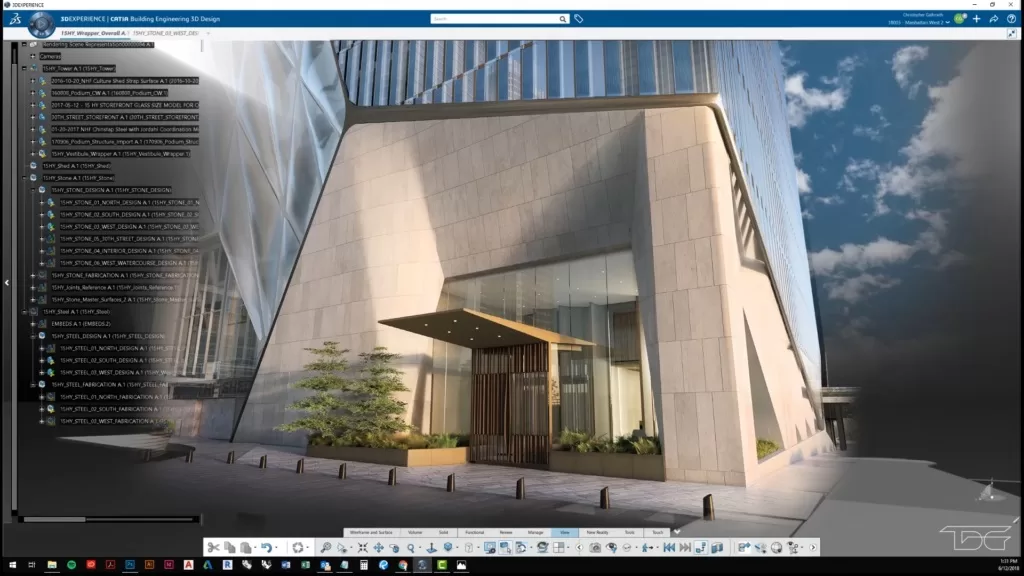
21. CATIA
CATIA is a sophisticated multi-platform suite originally developed for aerospace and high-precision engineering applications. Now adopted by architects working on complex, innovative projects, CATIA excels at advanced surface modeling and intricate parametric design.
Its powerful capabilities allow you to create highly detailed models that integrate with manufacturing and fabrication processes. While it offers a level of sophistication that can be overkill for standard projects, CATIA is ideal for groundbreaking designs that demand unparalleled precision and cross-disciplinary integration.
Key Features
- Advanced surface modeling for highly complex geometries
- Robust parametric design with bidirectional associativity
- Multi-disciplinary collaboration capabilities for integrated workflows
- Specialized workbenches tailored for complex architectural tasks
- Manufacturing and fabrication tools for precision production
- Systems engineering features to manage large-scale, integrated projects
Pros
- Delivers unmatched accuracy and precision
- Perfect for innovative, technically demanding design projects
- Integrates well across multiple disciplines and manufacturing processes
Cons
- Very steep learning curve requiring specialized training
- Considerably higher cost compared to mainstream architecture software
- Often more complex than necessary for standard architectural work
22. Cinema 4D
Cinema 4D is prized for its intuitive and powerful 3D modeling, animation, and rendering capabilities. Although its origins lie in motion graphics and visual effects, many architects appreciate its exceptional ability to generate dynamic, engaging presentations and walkthroughs.
Cinema 4D allows you to create complex animations and exceptional still images, making it ideal for showcasing your projects more narratively and experientially. Its intuitive interface and flexible toolset provide a balance between creative visual expression and technical rigor.
Key Features
- Intuitive procedural and polygonal modeling tools
- Advanced, physically based renderer for photorealistic imagery
- Robust animation tools for crafting dynamic architectural walkthroughs
- MoGraph module for creative object duplication and effects
- Integration with Adobe After Effects for post-production refinement
- Extensive plugin ecosystem for expanded functionality
Pros
- User-friendly interface that eases advanced animation and modeling
- Excels in creating immersive visual presentations
- Regular updates continuously enhance features and performance
Cons
- Not specifically designed for creating construction documents
- Lacks full BIM and technical drafting support
- Primarily focused on visualization rather than detailed design documentation
23. Fusion 360
Fusion 360 is an integrated, cloud-based platform that unifies 3D CAD, CAM, and CAE functionalities in a single comprehensive environment. While it is traditionally used in product and industrial design, Fusion 360 has found its niche among architects who design custom components or need precision in fabrication planning.
Its collaborative cloud features and parametric modeling tools allow you to efficiently design, simulate, and iterate on your projects. It is a versatile solution for combining creative and technical demands into one streamlined process.
Key Features
- Fully parametric modeling with extensive design history tracking
- Direct modeling tools for rapid and flexible form exploration
- Cloud-enabled collaboration with version control and multi-user access
- Integrated CAM tools for streamlined fabrication preparation
- Simulation and analysis modules for performance validation
- Custom API and Python scripting for extensive workflow automation
Pros
- Affordable yet full-featured solution for multi-disciplinary design
- Enhances team collaboration through a centralized, cloud-based system
- Excellent tool for designing custom components and detailed simulations
Cons
- Not purpose-built for full-scale building design
- Lacks extensive libraries for architectural-specific elements
- More focused on product design than complete architectural BIM workflows
24. Coohom
Coohom is a cloud-based interior design and visualization platform that simplifies the creation of realistic 3D room layouts and furnishing plans. Designed primarily for home staging, interior design, and furniture retail, Coohom offers an intuitive drag-and-drop interface and an extensive catalog of real-world furniture and decor items.
This solution helps you develop photorealistic space renderings quickly, making it ideal for designers who need to present concepts to clients or market properties efficiently. Its ease of use and specialized focus make it an indispensable tool in the interior design space.
Key Features
- User-friendly room and floor plan creation with a guided workflow
- Massive catalog of furniture and decor items from top manufacturers
- One-click rendering for fast, photorealistic interior visualizations
- 360° panoramic and VR-enabled presentation options
- Cloud-based storage for easy collaboration and remote access
- Material and lighting editing tools for precise interior adjustments
Pros
- Extremely accessible with a minimal learning curve for interior design
- Reduces the time needed for creating detailed, lifelike room visuals
- An extensive asset library minimizes the need for custom content creation
Cons
- Limited to interior space design; not suited for exterior or full-scale architecture
- Constrained by available library content, affecting customization
- The subscription pricing model may lead to ongoing costs
Selection Criteria for 3D Architecture Software
Selecting the ideal 3D architecture software for your projects involves evaluating several critical factors to ensure that the tool you choose meets your current needs and scales with your future ambitions.
Understanding Your Project Requirements
Before you decide, assess the scale and complexity of your typical projects. Are you designing small residential homes, large commercial structures, or specialized cultural institutions? Consider whether your focus is on rapid conceptualization or comprehensive construction documentation.
Tools like SketchUp and Rhino Excel were used during the early conceptual phase, while Revit and ArchiCAD are better for detailed documentation and BIM-based projects. Understanding your project type and design methodology helps you align your software choice with your creative and technical goals.
Budget and Cost Considerations
Financial factors significantly influence your decision. Compare the licensing models subscription-based services versus one-time perpetual licenses and consider the potential need for hardware upgrades to support demanding software.
Evaluate the costs of training your team and factor in ongoing maintenance or cloud service fees. Tools like Blender and FreeCAD offer robust functionality at little or no cost, while enterprise solutions like Revit may require a higher financial commitment. Balancing cost with the expected return on investment is essential.
Integration with Existing Workflow
The software you choose should work seamlessly with your current tools, enabling smooth file exchanges and collaborative work. Ensure that the program supports industry-standard file formats (such as IFC, DWG, OBJ), integrates well with your current CAD/BIM ecosystem, and has a familiar user interface that minimizes training time. Interoperability with consultants’ software and compatibility with both desktop and mobile solutions are also crucial for maintaining efficiency.
Technical Requirements and Capabilities
Finally, assess whether your existing hardware meets the system specifications needed by the software. Check for specialized features such as energy analysis, parametric design, and cloud collaboration.
Compatibility with mobile devices and cloud-based storage can also be deciding factors, especially if you operate in a distributed work environment. Customization options through APIs and scripting further enhance the software’s adaptability to your workflow.
Future Trends in 3D Architecture Software
Emerging Technologies
The future of architectural design is intertwined with the rapid development of emerging technologies. Artificial intelligence is beginning to automate routine tasks like layout optimization and material selection, saving you time and enhancing your design’s efficiency.
Generative design tools now allow you to explore thousands of design alternatives based on specific performance criteria, pushing the boundaries of creativity. Real-time visualization is rapidly evolving with GPU advancements, letting you witness changes as they occur without tedious rendering delays.
Virtual and augmented reality technologies are transforming client presentations, giving stakeholders an immersive preview of your ideas. These advancements are set to revolutionize how you approach design, ensuring that your workflows become more efficient and your projects more innovative.
Integration of BIM and Digital Twins
BIM adoption is rapidly expanding, and its integration into the full building lifecycle continues to grow. Open BIM standards are enhancing interoperability among software platforms, ensuring that every stakeholder has access to a unified, updated model. Moreover, digital twin’s real-time simulations of physical structures are set to become a cornerstone of building performance monitoring and maintenance.
These digital replicas, integrated with IoT sensors and predictive analytics, allow you to proactively manage energy use, simulate potential repairs, and optimize building operations even after construction is complete. As the industry moves towards sustainability and efficiency, these tools will play an increasingly crucial role.
Sustainability and Performance Analysis
Environmental concerns are driving the integration of sustainability analysis directly within design software. Many modern programs now include tools for energy modeling, daylighting analysis, and carbon footprint assessment.
This allows you to address environmental performance early in the design phase, ensuring that your projects meet green building standards such as LEED, BREEAM, or WELL. Future developments are poised to integrate further embodied carbon calculators, circular economy material databases, and advanced climate resilience modeling tools, enabling you to design buildings that are not only innovative but also ecologically responsible.
Conclusion
The Top 24 3D architecture software solutions of 2025 exemplify the transformative power of technology in modern architectural design. These tools have redefined how architects, designers, and engineers approach their craft, offering unparalleled precision, creativity, and efficiency. From advanced rendering capabilities to seamless collaboration features, these platforms cater to a wide range of needs, enabling professionals to bring their visions to life with remarkable accuracy.
Whether it’s designing intricate residential layouts, large-scale commercial projects, or urban planning initiatives, these software solutions provide the flexibility and innovation required to tackle complex challenges. Their integration with cutting-edge technologies like virtual reality and AI further enhances their utility, allowing for immersive visualizations and data-driven decision-making.
As the architectural landscape continues to evolve, these tools are not just software; they are essential partners in shaping the future of design. They empower professionals to push boundaries, streamline workflows, and create sustainable, forward-thinking structures that meet the demands of a rapidly changing world.
By leveraging the capabilities of these top-tier solutions, organizations and individuals alike can achieve new heights of creativity and productivity, ensuring their place at the forefront of architectural innovation in 2025 and beyond. These tools truly represent the future of architectural excellence.
If you found this comprehensive guide valuable, subscribe to our newsletter for the latest insights on architectural technology trends, in-depth software reviews, and expert tips to elevate your practice. Share this guide with fellow designers and join our community of innovative architects. Your feedback and engagement are the driving forces behind tomorrow’s breakthroughs. Let’s build a future of visionary, efficient, and sustainable design together!
Frequently Asked Questions
What is the Difference Between CAD and BIM Software?
CAD software specializes in precise 2D and 3D drawings used for technical documentation, offering unparalleled precision for individual design components.
In contrast, BIM software creates a comprehensive digital model that encapsulates not only geometry but also embedded data like material properties, costs, and performance analytics.
BIM fosters collaboration across disciplines by ensuring that every change in the model automatically updates all associated documentation, making it essential for large, complex projects.
How Do I Choose Between Different Software Options?
Choosing the right tool depends on your project’s scale, your design methodology, available hardware, and budget considerations. If rapid concept development is a priority, simpler tools like SketchUp or Rhino may suffice.
For full-scale construction documents and interdisciplinary collaboration, BIM solutions like Revit or ArchiCAD might be more appropriate. Additionally, consider interoperability, ease of learning, and support resources. Many platforms offer free trials, so you can test them before committing fully.
What Hardware Specifications Are Recommended for 3D Architecture Software?
For high-performance architecture work, you should have a multi-core, high-clock-speed CPU, at least 16GB (preferably 32GB or more) of RAM, and a professional-grade graphics card from NVIDIA or AMD. Fast SSD or NVMe drives are beneficial for quick file access, while high-resolution, color-accurate monitors enhance your ability to review designs with precision.
What is 3D Architecture Software?
3D Architecture Software refers to advanced computer programs designed to create, visualize, and simulate building designs and structures in a three-dimensional environment.
These tools enable architects and designers to develop detailed models, experiment with lighting, textures, and spatial layouts, and generate photorealistic renderings.
By transforming abstract concepts into tangible visualizations, 3D Architecture Software bridges creative ideas and real-world construction, becoming an essential resource for planning and executing modern architectural projects.
How does 3D Architecture Software streamline design processes?
3D Architecture Software streamlines design processes by providing integrated modeling tools that quickly transform ideas into accurate digital representations. Its features like real-time rendering, simulation, and iterative editing reduce planning time and identify potential issues early on.
Designers can swiftly modify elements, test scenarios, and collaborate in a unified digital environment. This efficiency not only improves workflow but also minimizes costly mistakes, making 3D Architecture Software a vital tool for successful, contemporary architectural design and project management.
What are the essential features of top 3D Architecture Software?
Top-tier 3D Architecture Software features robust 3D modeling capabilities, advanced rendering engines, and seamless Building Information Modeling (BIM) integration. Other essential aspects include user-friendly interfaces, customizable toolsets, and compatibility with diverse file formats.
These programs also offer dynamic simulation of lighting, textures, and environmental effects, which enhance overall design accuracy. In addition, effective communication and collaborative features ensure that every stakeholder can participate in refining the project, showcasing the vital role that 3D Architecture Software plays in advancing modern design.
Can beginners effectively use 3D Architecture Software?
Many 3D Architecture Software solutions are designed with beginners in mind, providing intuitive interfaces, guided tutorials, and an array of pre-built templates.
These tools lower the learning curve by offering simplified modeling options and extensive help documentation, which makes it easier for novices, even those new to architectural design, to experiment and grow.
As beginners gain confidence and skill, they can gradually explore more advanced features, ensuring that 3D Architecture Software caters to both entry-level users and seasoned professionals.
How does 3D Architecture Software enhance collaboration among design teams?
3D Architecture Software enhances team collaboration by offering real-time editing features and cloud-based project-sharing capabilities. Such platforms allow multiple stakeholders, from architects and engineers to interior designers, to work concurrently on a shared model.
Integrated Building Information Modeling (BIM) ensures that every collaborator views the most current data and design changes, reducing miscommunication. This synchronized workflow paves the way for creative teamwork, efficient problem-solving, and a unified vision throughout a project’s lifecycle.
What industries benefit most from 3D Architecture Software?
3D Architecture Software is a versatile solution benefiting diverse industries. Architects, construction firms, and urban planners rely on these tools to visualize and simulate designs, while interior designers and landscape architects use them to perfect spatial arrangements and aesthetics.
Even manufacturing and product design industries use 3D Architecture Software for prototyping and conceptual modeling. Its comprehensive modeling capabilities and realistic renderings enable professionals from many sectors to communicate complex ideas and facilitate more accurate project planning and execution.
How does BIM integration enhance 3D Architecture Software functionality?
BIM integration is a transformative feature in 3D Architecture Software. Merging design, engineering, and construction data into one cohesive model streamlines project workflows and improves accuracy. With BIM, every stakeholder can access up-to-date information, track changes, and collaborate effectively.
This integration minimizes errors and rework by ensuring that all aspects of a building’s design align with the project’s specifications and real-world constraints. Ultimately, BIM-enhanced 3D Architecture Software supports a more efficient, data-driven approach to modern project management.
Are there cost-effective options available with 3D Architecture Software?
Yes, 3D Architecture Software is available at various price points to suit different budgets. Many vendors offer free versions, trial periods, or subscription models tailored to students, small design firms, and independent architects.
These cost-effective solutions still provide robust features such as comprehensive 3D modeling, rendering, and BIM integration, ensuring that high-quality design tools are accessible. By comparing features and pricing plans, users can select a platform that meets both creative requirements and financial constraints without sacrificing functionality.
How does 3D Architecture Software support visualization in design projects?
3D Architecture Software is invaluable for bringing design projects to life through high-quality visualization. It transforms abstract concepts into detailed, photorealistic images and virtual walkthroughs, enabling stakeholders to explore spatial configurations and lighting effects before construction.
By experimenting with colors, materials, and perspectives, designers can optimize aesthetics and functionality. These visual tools not only aid in identifying potential design issues early but also help clients, investors, and team members fully grasp the envisioned outcome, ensuring every detail is meticulously refined.
What future developments can we anticipate in 3D Architecture Software?
Looking ahead, 3D Architecture Software is set to evolve with advanced features like real-time rendering enhancements, immersive virtual reality environments, and AI-driven design assistance.
Future updates may offer even more intuitive user interfaces, enhanced simulation accuracy, and seamlessly integrated collaboration tools with emerging smart city technologies.
As these innovations continue, architects and designers can expect streamlined workflows, reduced errors, and greater creative freedom empowering them to transform their visions into realistic, cutting-edge structures more efficiently than ever before.